
Compare
BuildPress vs Novamira
Two WordPress plugins, one idea: connect your AI agent to your site over MCP. The difference is what the AI is allowed to do once it is inside. Here is a fair, fact-checked look at both.
 1h 10m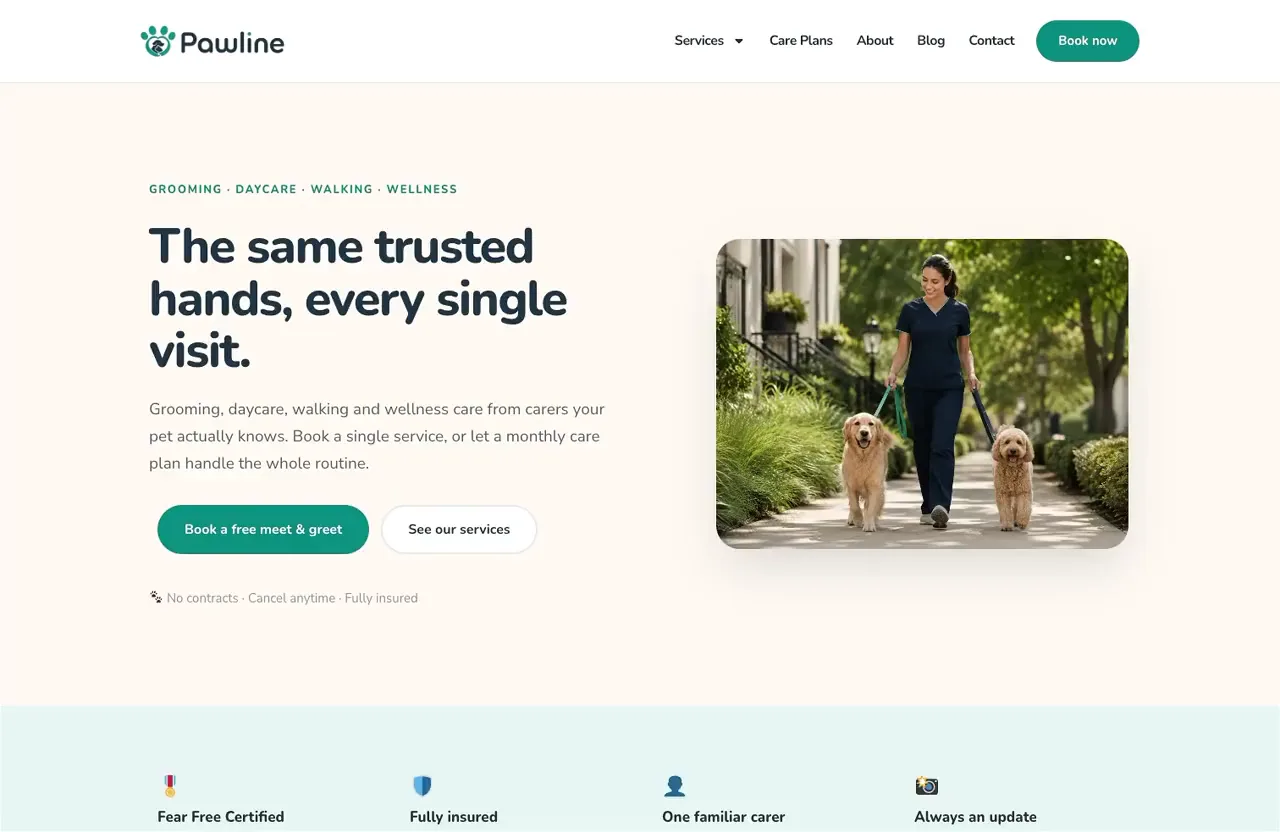
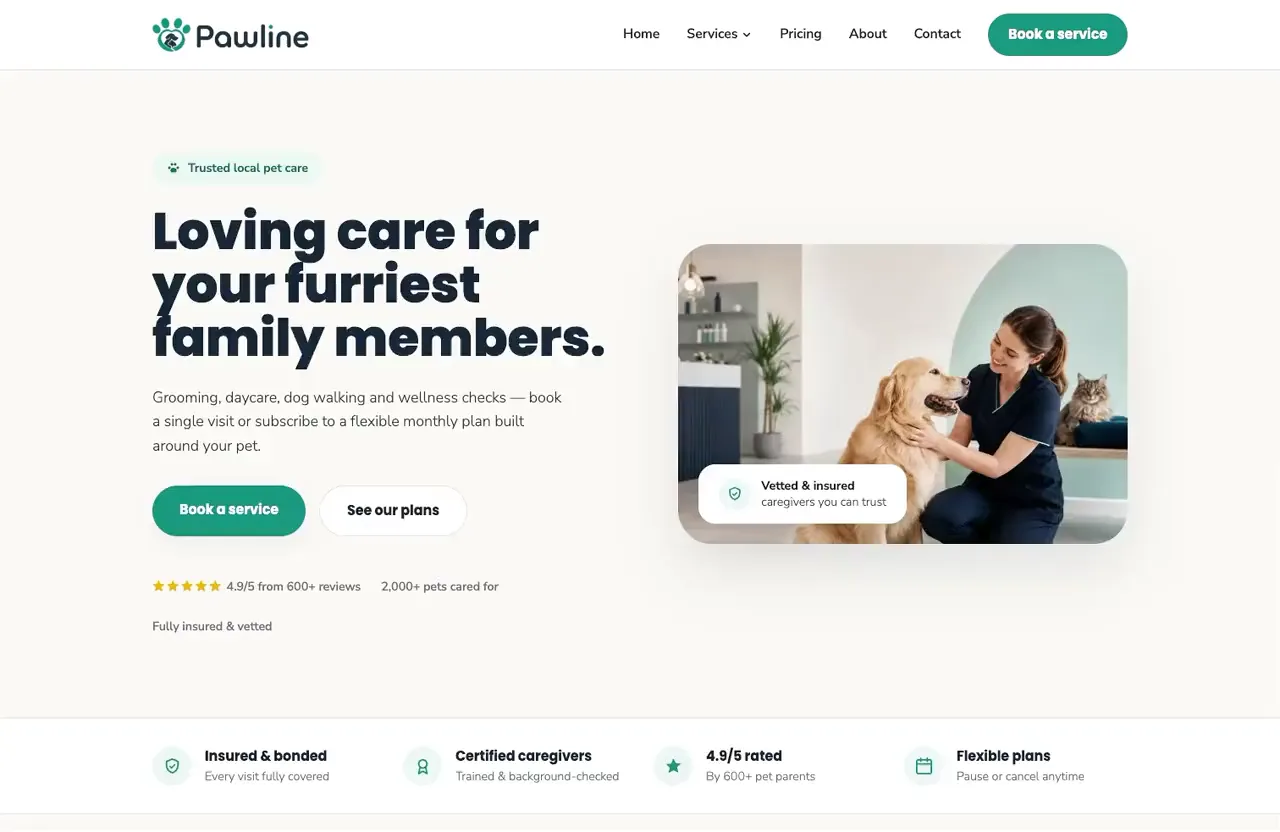
The same site brief, built by both plugins. The full story is below.
Same idea, different end goal
The two systems are closer than you might expect: both make WordPress agentic, and both write real code and content inside your site through your AI client. The split is how much extra each one does around the build, and what each is building toward.
The BuildPress goal
BuildPress
BuildPress writes real code and content inside your site like any capable agent setup, then does the extra work around it that keeps results accurate: widget-first builds with render verification, AI-built design systems, unlimited Project Memory, and a feedback loop your clients use right on the live page. It hand-builds AI tools for every plugin it integrates, even plugins with no AI support of their own, and pushes past stock WordPress with things like the bundled GSAP animation engine. One paid plugin, every feature in every plan, built for live sites.
The Novamira goal
Novamira
Novamira works much the same way at its core: it connects your AI agent to WordPress and lets it build through PHP, WP-CLI, database queries, and file edits. It is a capable tool with a free open-source core; it simply does less around the build itself, and by its own guidance it belongs on dev and staging environments, with backups, always.
Same job, both tools
We gave both plugins the identical job: build a complete website for Pawline, a pet care business, through the same AI client (Claude Code), on fresh WordPress installs with Elementor. Only the plugin changed. These are the two AI sessions that ran it, click either one to read the whole thing.
What each one built
The finished Pawline sites, recorded as-is and live to browse: BuildPress on the left, Novamira on the right. Both plugins delivered a proper production-level site, every page plus custom post types (services, care plans, testimonials, team) with their own meta fields and taxonomies, each in its own way.
BuildPress
Novamira
Click any recording to watch it full size.
What BuildPress has that Novamira doesn't
Three big BuildPress capabilities with no Novamira equivalent: client feedback, GSAP animation, and Figma sync.
The client feedback system
You, your team, or your clients pin feedback right on the live page, with the exact element, screenshot, and breakpoint captured automatically. Threads, statuses, priorities, assignees, and feedback you can hand straight to the AI to fix.
How Feedback worksGSAP animation engine
A professional animation engine in the box: scroll-triggered reveals, parallax, pinned sections, and text animation, asked for in plain English. Motion that normally needs a specialist developer, right inside your page builder.
GSAP in BuildPressSmart Figma sync
Design systems flow straight from Figma: import the palette and type scale, detect what the design actually uses, and merge updates as it evolves. Your AI builds with the same system your designer works in.
Figma sync in depthBuildPress in action
Elise Archives and Stillform Atelier are real BuildPress demos that lean hard on the GSAP animation engine, with heavy motion across nearly every section. Sites like these are exactly what the tools above unlock; open one to explore the live site.
Feature by feature
Shipped features only, on both sides. No roadmap rows, no padding.
| Feature | BuildPress | Novamira |
|---|---|---|
| The basics | ||
| Runs on your own WordPress install and hosting | ||
| Connects your AI client over MCP (Claude Code, Cursor, Windsurf, and more) | ||
| Uses your existing AI subscription, no usage metering | ||
| Free tier | No, one paid plugin | Yes, open-source core |
| How the AI builds | ||
| AI writes real code and content on your site | ||
| How that code lands | Purpose-built, verified tools | Direct PHP, WP-CLI, database, files |
| Hand-built AI tools per integrated plugin, even without native AI support | Pro expertise modules | |
| Same-brief head-to-head build time (the Pawline test above) | 1h 10m | About 2h |
| Render verification, the AI checks its own output | ||
| Unlimited widget library (components, sections, headers, footers) | ||
| AI-built design systems | ||
| Smart Figma sync | ||
| GSAP animation engine included | ||
| Unrestricted PHP runtime for the AI | No, tools are scoped | Yes |
| Project Memory | ||
| Persistent memory across sessions | Unlimited, every plan | Pro only |
| Client collaboration | ||
| Feedback pinned on the live page (screenshot, element, viewport) | ||
| Threads, status, priority, and assignees | ||
| Assign feedback to the AI to fix | ||
| Production use | ||
| Recommended for live production sites | Dev and staging only | |
| App Passwords or OAuth authentication | ||
| Domain lock | ||
| Audit log of AI actions | ||
| Auto-disable safeguards | ||
| Pricing and licensing | ||
| Licensing model | Every feature in every plan | Free core plus Pro gates |
| Yearly pricing | $49 / $129 / $199 | EUR 49 / EUR 129 |
| Sites covered | 1 / 100 / Unlimited | 3 / 1,000 |
| Lifetime option | $79 / $149 / $299, any plan | EUR 249, Agency only |
| Refund window | 14 days | 30 days, not on renewals |
Page last updated July 2026. Novamira details checked against novamira.ai in July 2026 (pricing, tools, security, and docs pages), and the Pawline head-to-head was run the same month. Novamira is a product of its respective owner and is not affiliated with BuildPress. Spotted something out of date? Tell us and we will fix it.
Pick the tool that fits your work
Choose BuildPress if
- You ship on live WordPress sites, with clients in the loop: feedback pinned right on the page and the AI working the queue.
- You want accurate builds from a plain brief, no stack-spelling needed: purpose-built tools, render verification, and plugin abilities that are checked on your site do the extra work, the way the Pawline build landed in 1h 10m.
- You want results past stock WordPress: GSAP-grade animation, AI-built design systems, and Figma sync, like the demos above.
- You want every feature on every plan, with a lifetime license available at any tier.
Novamira is a fine choice if
- You are a developer working on dev or staging installs and want direct PHP, WP-CLI, and database access.
- Your day-to-day is data migrations, bulk operations, and custom code more than design and client delivery.
- You want a free, open-source core and only pay when you need memory and the Pro expertise modules.
Common questions
Let's build your next
WordPress project with AI.
Get BuildPress, activate it, and plug in the AI you already pay for. Build your first page through conversation, and when it's live, the feedback loop is already there for you, your team, or your clients.